
Home
Work the bands from your Mac.
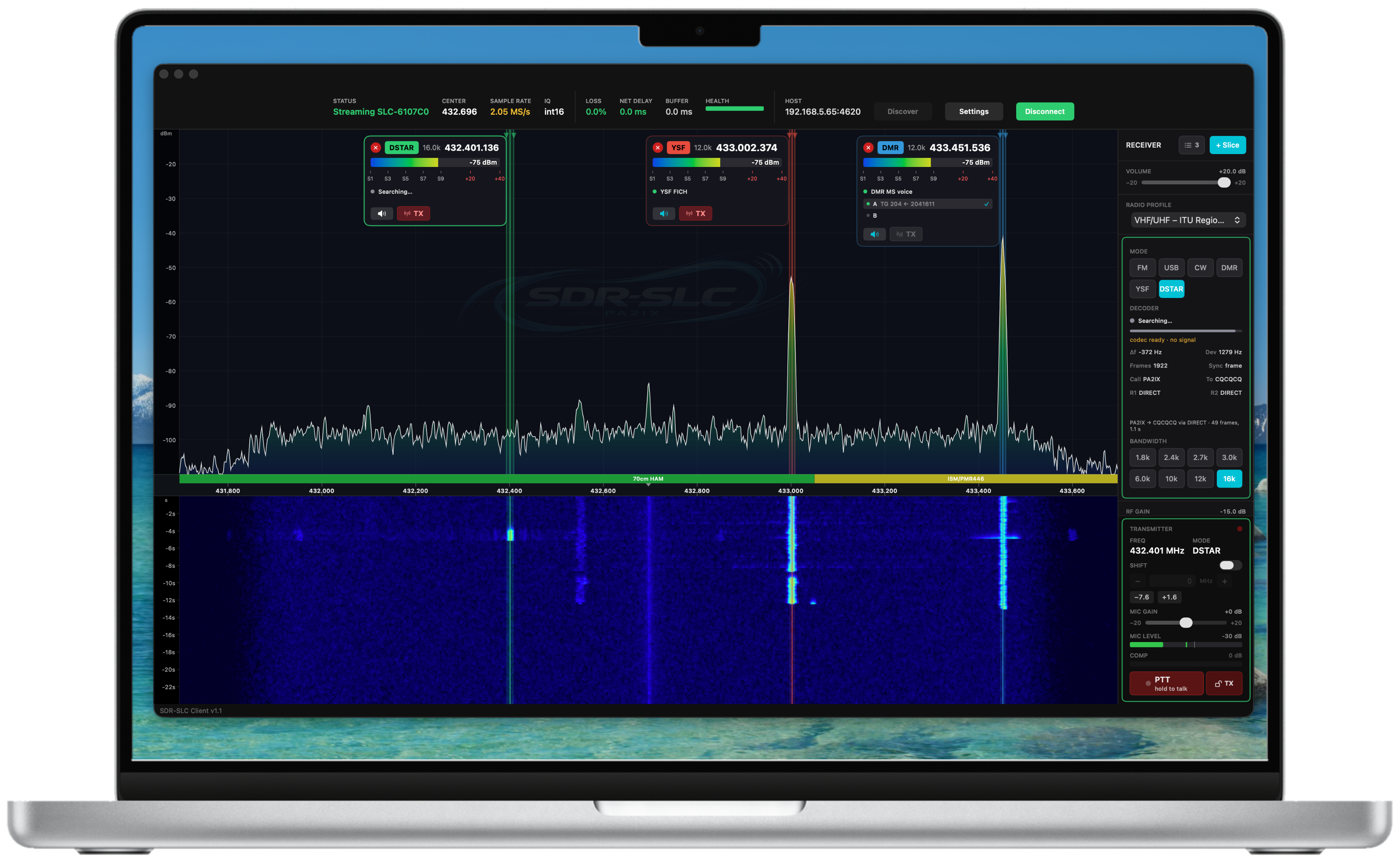
SDR-SLC is a software-defined radio client that feels like it belongs on a Mac. Spectrum and waterfall, several receivers at once, and receive and transmit in SSB, AM, FM, CW, DMR, YSF and D-STAR. There's a CW decoder built in as well.
Put an RTL-SDR on a Raspberry Pi and you're listening for a little over a hundred euros. Add a bladeRF and you're on 2 m and 70 cm.
There's free SDR software. Here's what €24.99 gets you.
Some free SDR programs can do more than SDR-SLC, and if you enjoy wiring up flowgraphs and tuning dozens of settings, they're a lot of fun. SDR-SLC is for when you want to operate: one window, controls where you expect them, and every mode on the same radio.
Every mode, receive and transmit
SSB, AM, FM, CW, DMR, YSF and D-STAR in the same window, on the same radio. No second program for digital voice, and no extra handheld for each mode.
It behaves like a Mac app
One consistent interface from the waterfall to the transmit button. Nothing to compile on the Mac, and updates arrive through the App Store.
Slices
Drop receivers anywhere on the spectrum. Each slice has its own mode, filter and S-meter, and you can listen to several at the same time.
A CW decoder
Built in, so the text appears while you listen. Handy when the code is faster than your ears.
Your local repeater
Open the DMR repeater down the road on either timeslot, or the local YSF repeater, straight from your Mac.
Try it before you build
The built-in demo radio shows a live band with CW and FM signals, so you can learn the client before you buy any hardware. Real radios are found automatically when you click Discover.
Start with the hardware that fits your budget.
Get the client
From the Mac App Store, €24.99. The demo radio works straight away.
Pick a radio
An RTL-SDR on a Raspberry Pi to listen, a bladeRF to transmit on VHF and UHF, or the HF transceiver you build yourself.
Follow the guide
Each setup has a step-by-step guide, from an empty SD card to a signal on your screen. Transmit within your licence.
Built on a standard anyone can use.
Underneath the client sits SDR-SLC, a set of openly published protocol specifications. They describe how clients and radios find each other on the network, exchange control information and stream radio data, independent of any particular radio, operating system or programming language. Implement them in your own receiver, transceiver, daemon, firmware or client, and it works with everything else that follows them.
The Mac client was developed and debugged alongside those specifications, and it is their reference implementation. If you're building a radio or backend of your own, you can test it against a client that is known to be right, and hear what your hardware does before you've written a single line of user interface.
The client is commercial software, available from the Mac App Store for €24.99, and its source code is not part of the open-source projects. The purchase pays for the engineering, testing and maintenance that keep it a dependable reference.
Read the specifications →The app is the only part you pay for.
The software that runs your radio, the codec server, the HF transceiver design and the specifications that tie them together are all free and open. Build your own radio, write your own daemon, or improve the ones that are here.
SDR-SLC reference client for macOS
Spectrum, waterfall, slices, receive and transmit, analog and digital voice, in one native Mac app. Also the reference for anyone building a backend.
Station setups
RTL-SDR, bladeRF or the HF transceiver: what each one gives you, and a step-by-step guide for each.
Open protocol specifications
The common standard. Develop compatible radios, daemons, clients and tools against documented interfaces.
Daemons: RTL-SDR · bladeRF · Codec server
The open-source software on the Raspberry Pi that turns your hardware into an SDR-SLC radio.
HF transceiver: schematics & firmware
Study the design and build your own SDR transceiver for 1.8 to 30 MHz.
Engineering blog and build log
Experiments, engineering decisions, development progress and lessons learned.
Developed by Ivo van Ling, PA2IX.
SDR-SLC is developed by Ivo van Ling, amateur radio operator PA2IX. The project combines professional telecommunications engineering experience with an interest in embedded systems, software-defined radio and open technical standards.
I could walk into a shop tomorrow and buy an Icom, a Yaesu, a Kenwood, an Elecraft or a FlexRadio. For me, though, spending thousands of euros on a radio to make the occasional QSO isn't what this hobby is about. The fun is in building the station yourself, understanding every part of it, and getting more out of it than anyone expected.
What I did want was the experience those expensive rigs give you: everything where you expect it, controls that respond the moment you touch them, a radio you enjoy sitting down at. Digital voice made the gap even clearer. DMR, YSF and D-STAR each come with their own kind of radio, and I ended up buying three of them just to test my own implementation against. Nobody else should have to.
So I set myself a challenge: software that feels like an expensive rig, with most of the hardware behind it built at home for a fraction of the price. That became SDR-SLC. SLC stands for Super Low Cost, or for Slice, depending on how you look at it. Both are true.
The aim is to give the amateur radio community an open technical foundation, supported by a reliable reference application that makes experimentation and independent development easier.
Questions, ideas or feedback? Get in touch.
73 de PA2IX